
That familiar, acrid smell of burnt fiberglass and fried silicon hits your nose at 2:14 AM. You just sent 12 volts directly into the 5-volt rail of your microcontroller board, and now a tiny wisp of magic blue smoke is curling up toward the ceiling. Your project is dead. Your board is a very small, very ugly paperweight.
Here is where the rubber meets the road.
If that board was an official, Italian-made Arduino UNO R3, you just vaporized about twenty-five bucks. If it was an Elegoo UNO R3, you lost roughly ten dollars. As you sit there staring at the blackened voltage regulator, rubbing your tired eyes, the obvious question hits you hard.
Is there actually any difference between these two boards, or are you just paying a massive premium for a tiny map of Italy silkscreened onto the back?
I have spent the better part of a decade wiring up sensors, building janky robotics, and teaching absolute beginners how to make an LED blink without electrocuting themselves. I’ve bought the expensive stuff. I’ve bought the dirt-cheap, unbranded clones shipped directly from Shenzhen in suspicious gray plastic bags. I have seen exactly where these boards fail, why they fail, and what happens when you plug them into a laptop running a stubborn operating system.
Let’s strip away the marketing fluff and look at the raw copper, the silicon chips, and the cold, hard economics of DIY electronics.
The Open-Source Hardware Loophole
Before we compare solder joints, we have to clear up a massive misconception that plagues the maker community. People constantly ask if Elegoo is “stealing” from Arduino, or if buying an Elegoo board makes you complicit in some shady intellectual property theft.
No. It doesn’t.
Arduino built its entire empire on the concept of open-source hardware. They designed the circuit, picked the components, drew up the schematics, and then deliberately published those files online under a Creative Commons license. They effectively handed the blueprints to the world and said, “Have at it.” Anyone is legally allowed to take those exact schematics, print their own printed circuit boards (PCBs), solder on the components, and sell them for a profit.
The only thing you cannot do is print the trademarked “Arduino” name or their infinity logo on the board. That is a strict legal boundary.
Elegoo operates entirely within the rules of this game. They took the open-source blueprints for the Arduino UNO R3, manufactured the board to exact specifications, slapped their own branding on it, and priced it aggressively. They are not a bootleg operation working out of a damp basement. They are a massive, highly structured manufacturing entity.
So, legally, they are identical twins. But biologically? That’s where things get interesting.
Silicon Deep Dive: What Actually Lives on the PCB?
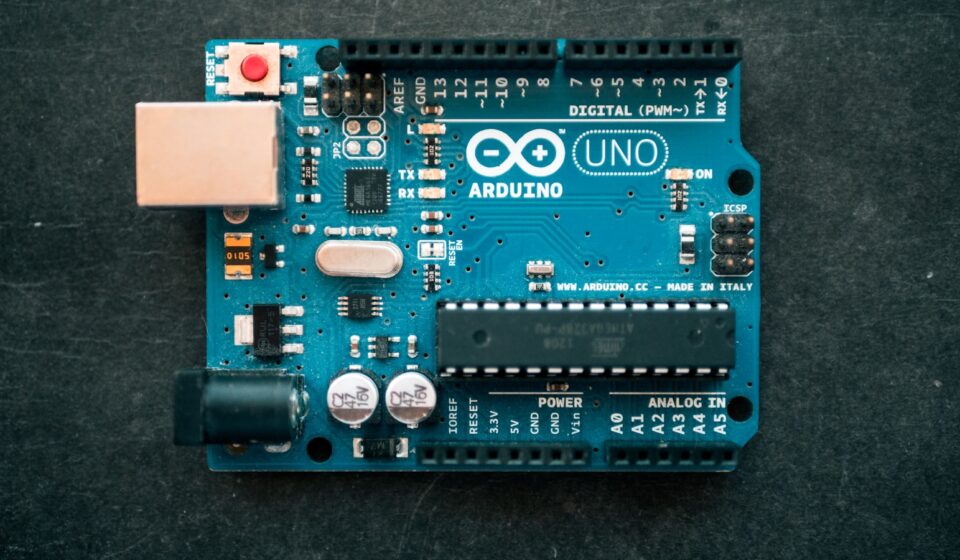
Look closely at the center of an official Arduino UNO R3. You will see a long, rectangular, black chip with 28 little metal legs. That is the brain. Specifically, it is the ATmega328P microcontroller, originally designed by Atmel (a company since swallowed up by Microchip Technology).
Now, pick up an Elegoo UNO R3.
Look at the center. You will see the exact same ATmega328P chip. Elegoo does not manufacture their own microcontrollers. They buy the exact same silicon brains from the exact same global supply chains that Arduino uses. When you write a piece of C++ code to tell a servo motor to sweep 180 degrees, that code is being processed by identical physical hardware, regardless of which brand you bought.
Same brain.
Different nervous system.
The primary physical difference between an official Arduino and an Elegoo clone lies in a secondary, easily overlooked component: the USB-to-Serial converter.
When you plug a USB cable into your computer, your computer speaks one language (USB), and the ATmega328P chip speaks another (Serial). You need a translator chip sitting between them to facilitate communication. If this translator fails, your computer won’t recognize the board, and you can’t upload any code.
Arduino uses a secondary, smaller Atmel chip—usually an ATmega16U2—programmed specifically to act as this translator. It is highly reliable, heavily documented, and natively recognized by almost every operating system on the planet.
Elegoo, looking to shave off manufacturing costs, swaps this out for a much cheaper Chinese chip called the CH340 (or CH340G). For a long time, this tiny substitution was the bane of the maker community.
The Great Driver Nightmare of 2017
Let me tell you a quick story about the CH340 chip. Back in 2017, I was running a weekend workshop for twenty eager high school students. I had purchased a bulk pack of cheap clone boards to keep the budget manageable. We spent the first hour building a simple traffic light circuit on our breadboards.
Then came time to plug the boards into our MacBooks.
Nothing happened. The Arduino Integrated Development Environment (IDE) refused to see the boards. Why? Because macOS did not include native drivers for the CH340 chip. We had to spend the next two agonizing hours downloading sketchy, unsigned driver packages from poorly translated websites, bypassing Apple’s strict security protocols, and restarting twenty laptops multiple times.
It was a total disaster.
Today? The situation is drastically different. Modern operating systems—including Windows 11, recent macOS versions, and most Linux distros—now come with CH340 drivers pre-installed or fetch them automatically in the background within seconds. You plug an Elegoo board in, and it just works. The driver friction that used to justify buying the official board has almost entirely evaporated.
Let’s Talk About the Manufacturing Floor
If the chips are basically doing the same job, where does the price difference come from? It mostly comes down to geography, labor costs, and quality control tolerances.
Official Arduino boards are manufactured in Ivrea, Italy. They are built in facilities that adhere to strict European labor laws and environmental regulations. When you hold an official board, you can feel the quality. The fiberglass edges are perfectly smooth. The teal silkscreen printing is incredibly crisp—you can read even the tiniest font without a magnifying glass. The female header pins (where you plug in your wires) are aligned with robotic precision.
Elegoo boards are manufactured in Shenzhen, China. The aesthetics are slightly rougher. The blue solder mask is a bit darker. Sometimes, if you look very closely, you might notice that a header pin is sitting at a microscopic half-degree angle. The silkscreen might be slightly blurry on the tiny numbers next to the analog pins.
Does a slightly crooked header pin affect the flow of electrons? Absolutely not.
Does it matter to a beginner? Never. The only time manufacturing tolerances truly matter is if you are building a custom “shield” (an add-on board that plugs directly into the top of the UNO) and the pins are so misaligned that the shield won’t physically fit. In my experience with Elegoo over the past five years, their quality control has tightened up so much that this is practically a non-issue. They are the undeniable kings of the clone market for a reason.
The “Starter Kit” Economics: Unboxing the Real Value
Nobody buys just a bare microcontroller when they are starting out. You need stuff to attach to it. You need flashing lights, buzzing speakers, little motors, and a mess of colorful wires.
This is where Elegoo completely dominates the conversation.
Let’s look at the official Arduino Starter Kit. It currently retails for around $100 to $110. It comes in a beautiful, minimalist cardboard box. Inside, you get a genuine UNO R3, a custom-designed wooden base to hold your board, a decent assortment of high-quality components, and a beautifully printed, 170-page project book that walks you through 15 distinct projects. It feels premium. It feels like a high-end educational tool.
Now, look at the Elegoo Super Starter Kit. It retails for about $35 to $40.
It comes in a sturdy plastic tackle box with snap closures. Inside, you get their UNO R3 clone. But you also get a massive, overwhelming pile of components. You get an RFID reader, a numeric keypad, an ultrasonic distance sensor (the famous HC-SR04), a joystick module, a stepper motor, a servo, an IR remote control—stuff that the official kit doesn’t even touch.
Instead of a printed book, Elegoo provides a downloadable PDF and a CD (yes, a CD, which is highly amusing given that no computer has had a disc drive since 2014). The PDF tutorials are… okay. They lack the pedagogical polish of the official Arduino book. The English translation is sometimes a bit clunky. The code examples work, but they rarely explain *why* the code works.
If you are a self-starter who is comfortable Googling things when you get stuck, the Elegoo kit offers an absurd amount of hardware for the price of a cheap dinner.
The Microcontroller Reality Check
To make this incredibly clear, I have mapped out exactly how these two boards stack up against each other across the metrics that actually matter when you are sitting at a workbench covered in wire clippings.
| Feature / Metric | Official Arduino UNO R3 | Elegoo UNO R3 Super Starter Kit Board |
|---|---|---|
| Main Microcontroller | ATmega328P (Removable DIP version) | ATmega328P (Removable DIP version) |
| USB-to-Serial Chip | ATmega16U2 (Highly compatible) | CH340G (Requires drivers on older OS) |
| Operating Voltage | 5 Volts | 5 Volts |
| Input Voltage (Recommended) | 7-12 Volts via barrel jack | 7-12 Volts via barrel jack |
| Country of Origin | Italy | China |
| Average Price (Board Only) | $24.00 – $28.00 | $12.00 – $15.00 |
| Build Quality & Aesthetics | Immaculate. Crisp silkscreen. | Functional. Occasionally minor cosmetic flaws. |
| Ideal Target User | Schools, purists, corporate prototypes. | Hobbyists, budget-conscious students, makers. |
Why Do People Still Buy Official Arduinos?
If Elegoo does the exact same thing for half the price, you might be wondering how the official Arduino company stays in business. Are people just ignorant? Are they easily duped by brand names?
Not at all.
Buying an official board is often an ideological choice, or a highly practical one depending on your professional environment.
First, there is the software tax. The Arduino IDE—the software program you download to your computer to write the code—is completely free. It is maintained by a team of paid software engineers who constantly patch bugs, update libraries, and keep the system running across Windows, Mac, and Linux. When you buy an official $25 board, you are funding the development of that software. You are keeping the servers running for the massive Arduino forums where millions of people go to beg for help when their code won’t compile.
If everyone on earth only bought cheap Chinese clones, the central company would bankrupt itself, the software would stagnate, and the entire community would slowly collapse.
Second, there is institutional purchasing. If you are an engineering professor at a major university buying 200 boards for a freshman robotics lab, you do not buy Elegoo. You buy official Arduino. Why? Because you need absolute, ironclad guarantees of consistency. You need a vendor you can call on the phone if a batch is defective. You need a purchase order that the university’s accounting department will approve without a headache. The premium price is an insurance policy against administrative friction.
Third, industrial prototyping. Let’s say you are an engineer at an agriculture tech startup building a prototype for an automated irrigation system. You are going to leave this board running in a hot, dusty greenhouse for six months to collect data. You do not risk a $100,000 project on a $12 clone to save thirteen bucks. You buy the official, Italian-made board because the voltage regulators are slightly higher quality and less likely to fail under continuous thermal stress.
The Bootloader and the IDE: Software Doesn’t Care
One of the most persistent fears beginners have is that an Elegoo board somehow won’t understand Arduino code. They worry there is a secret language barrier.
Let me put this to rest entirely.
The Arduino IDE is beautifully blind. When you hit the “Upload” button on your computer screen, the software takes your human-readable C++ code, compiles it down into raw hex machine code, and shoves it down the USB cable. It does not check the brand name on the board. It does not look for a watermarked logo.
All it looks for is a tiny piece of software called a “bootloader” living on the ATmega328P chip. The bootloader is basically a tiny receptionist that stands at the door of the chip, waiting for new code to arrive from the USB port, and then writes that code into the chip’s flash memory.
Elegoo flashes the exact same open-source Optiboot bootloader onto their chips before they leave the factory. The IDE thinks it is talking to an official board. The code executes exactly the same way. A delay of 1000 milliseconds is exactly one second on an Arduino, and it is exactly one second on an Elegoo.
You will never write a piece of standard code that works on one but fails on the other.
A Pragmatic Framework for Choosing
You have a credit card in your hand and two browser tabs open. Which one do you actually buy? I use a very specific, ruthless logic map when advising people on this exact purchase. Ask yourself these questions in order:
- Are you buying this as a gift for a 12-year-old? Buy the official Arduino Starter Kit. The printed project book is invaluable. A kid will get frustrated and quit if they have to read poorly translated PDF instructions on a screen while trying to wire up a breadboard. The book keeps them focused.
- Are you a broke college student or a curious adult on a tight budget? Buy the Elegoo Super Starter Kit. You get vastly more hardware to play with, and you are entirely capable of Googling “How to wire an HC-SR04 sensor” when the included PDF doesn’t make sense.
- Are you building a permanent project that will live inside a wall or outside in the elements? Buy the official Arduino. The slightly better power regulation components offer peace of mind when you can’t easily access the board to reset it.
- Are you planning to build a project that requires intentionally destroying boards? (e.g., high-voltage experiments, battling combat robots). Buy Elegoo. Buy five of them. Treat them as disposable ammunition.
- Do you heavily rely on the Arduino forums and want to support the ecosystem? Buy official. It’s the ethical choice if you have the disposable income.
Beyond the UNO R3: The Wider Family
We’ve spent a lot of time talking about the UNO R3 because it is the undisputed heavyweight champion of the beginner electronics world. It is the board everyone starts with. But eventually, you outgrow it.
You realize you don’t have enough pins to run six motors at once. Or you realize the board is physically too massive to fit inside the 3D-printed lightsaber hilt you designed.
When you start scaling up or scaling down, the Elegoo vs. Arduino dynamic remains largely the same, but the financial stakes change.
The Mega 2560
When you need more pins and more memory, you step up to the Arduino Mega 2560. It is a massive, long board packed with I/O ports. An official Arduino Mega will easily run you close to $45 or $50. An Elegoo Mega 2560 clone sits right around $20.
At this price point, the clone becomes incredibly attractive. The Mega is often used in complex 3D printer builds or massive home automation rigs. If you accidentally fry a Mega, replacing a $50 board physically hurts. Replacing a $20 board is just an annoying Tuesday.
The Nano
When you need to shrink your project, you move to the Arduino Nano. It packs all the power of the UNO into a board the size of your thumb. An official Nano is about $20. You can buy a three-pack of Elegoo Nanos for $15.
When I am building small, permanent projects—like a customized macro keyboard or a little desktop weather station—I almost exclusively use cheap Nano clones. I solder them permanently onto perfboards. They become embedded in the project forever. Buying a $20 official board just to entomb it in hot glue and plastic feels like a massive waste of resources.
The Hidden Cost of Cheap Clones: Sourcing Components
There is one incredibly specific, deeply frustrating scenario that rarely gets discussed until you are knee-deep in a project. It involves the actual, physical components that come in the cheaper starter kits.
While the microcontroller board itself is usually rock solid, the peripherals included in the Elegoo kits can sometimes be… temperamental.
Take the breadboard, for example. A breadboard is the white plastic block with holes where you plug in your wires. A high-quality breadboard has tight, springy metal contacts inside. When you push a wire in, it grabs it firmly. Cheap breadboards—like the ones occasionally bundled in budget kits—have loose contacts. You will spend three hours debugging your code, rewriting your logic, and pulling your hair out, only to realize that the code was perfect all along. The problem was a loose wire sitting in a cheap breadboard hole, breaking the electrical connection.
The same goes for the jumper wires. The wires included in budget kits are often very thin, with brittle internal copper strands. You bend them too many times, and they snap internally. The plastic insulation looks completely intact, but the wire is dead inside. These invisible hardware failures will drive you to the brink of insanity.
If you go the Elegoo route to save money, I highly recommend spending an extra $10 to buy a premium breadboard and a high-quality set of jumper wires from a reputable electronics supplier. It will save you a massive amount of psychological trauma.
The Evolution of the Boards
It is also worth noting that the landscape is not static. Arduino recently released the UNO R4. This is a massive leap forward. They completely abandoned the old ATmega328P chip and moved to a much more powerful, modern 32-bit ARM Cortex-M4 processor (made by Renesas). The UNO R4 has built-in Wi-Fi, an LED matrix on the board, and vastly more processing power, all while keeping the exact same physical footprint as the old R3.
This completely shifted the power dynamic.
Elegoo, as of right now, is primarily known for cloning the older R3 architecture. Cloning an R4 is vastly more complicated due to the complex radio modules and the specific licensing around the Wi-Fi chips. So, if your project demands modern processing power, native internet connectivity for IoT projects, or complex mathematical calculations, the decision makes itself. You buy the official Arduino UNO R4. The cheap R3 clones physically cannot compete with that level of modern hardware.
But for turning a motor, reading a temperature sensor, and blinking a light? The old R3 architecture will outlive us all.
The Verdict from the Workbench
Let’s pull all these threads together into something you can actually use.
The electronics hobby space is notorious for its gatekeeping. You will absolutely encounter purists on internet forums who will talk down to you if you post a picture of an Elegoo board. They will claim you aren’t a “real” maker, or that you are contributing to the death of open-source innovation.
Ignore them entirely.
The entire point of open-source hardware was to democratize access to technology. Massimo Banzi and the original Arduino team created this platform so that art students, hobbyists, and regular people without engineering degrees could build interactive objects. They wanted the barrier to entry to be as low as physically possible.
Elegoo took that philosophy and lowered the financial barrier to the absolute floor.
If you have the budget, buying official Arduino hardware is a fantastic way to support the creators of the software you are using for free. You get a beautifully manufactured piece of Italian hardware and the peace of mind that comes with premium quality control.
But if spending $100 on a starter kit means you can’t afford to pay your electric bill, or if it means you simply won’t start the hobby at all? Buy the $35 Elegoo kit. Buy it without a single ounce of guilt. You are getting a highly functional, legally compliant, practically identical piece of hardware that will teach you the exact same C++ programming skills, the exact same electrical engineering principles, and the exact same problem-solving frameworks.
The electrons flowing through the copper traces do not care whose name is printed on the fiberglass. They only care that the circuit is closed.
Grab a board, plug it in, and go build something terrible that barely works. That is the only way you actually learn how to do this.